How I Use Cursor for Agentic Operations
I am an operator. Most of my work is project-shaped: moving pieces, ambiguous asks, a mix of people and documents to coordinate, and a real outcome that has to exist at the end.
Chatbots have been deeply impactful for that work. They help me think faster, draft faster, and move through ambiguity with a lot less friction. But I have been learning that there is a real difference between working with a chatbot like Claude or ChatGPT and working with a true agent-oriented approach.
Ops work is project-oriented, and that is what makes an agentic workspace like Cursor so powerful.
What is Cursor?
Cursor is an AI-native IDE, a coding tool, used primarily for software development. If you do not spend your days surrounded by engineers, an IDE is basically the place where the files, tools, and agent workflows all live together.
Chat tools can give me a response, and even generate meaningful output like docs, PDFs, or HTML. An agentic workspace produces those artifacts, as well as the assets used to generate them, a place to persist: the plan, the source material, the review notes, the tests, the handoffs, and the run history all live there together.
That difference becomes very obvious once the work has real scope and stakes. When a project needs research, writing, review, revision, validation, communication, coordination, and packaging all moving at the same time, I do not just need a smart model. I need a contained, structured space for the work to live in.
In the past, this has been a chaotic combination of excell sheets, and Google Drive files, and Notion, emails, and a dozen other tools, manually held together by sheer force of will in a color-coordinaed Monday Board.
But scaling operation across sales, marketing, people operations, customers, and product, requires more hours in a day than I have. And unifying that chaos into a clear, AI-native structure enables me to get more done in the fraction of the time it took before.
Quick example: We had two years of material on Agentic Data Engineering spread across labs, blog posts, docs, and internal notes. The knowledge was there. The learning path for practitioners and users was not. Everyone wanted to leverage AI and agents for data workflows, but people felt intimidated to try. I needed to turn that sprawl of material into a real certification program. With 48 hours, a small host of agents, and couple hundred dollars of tokens, I shipped a full production-ready three-course, 21-module certification program. What, in the past, would have taken a team of 4 or 5 developers weeks to deliver, a single non-engineer could deploy in 2 days.
That kind of scope and velocity is the difference between chatbot help and agent-oriented work. It is not simply AI spitting out an unverified draft. It is collaborating with agents the way I would collaborate with a team to run a project.
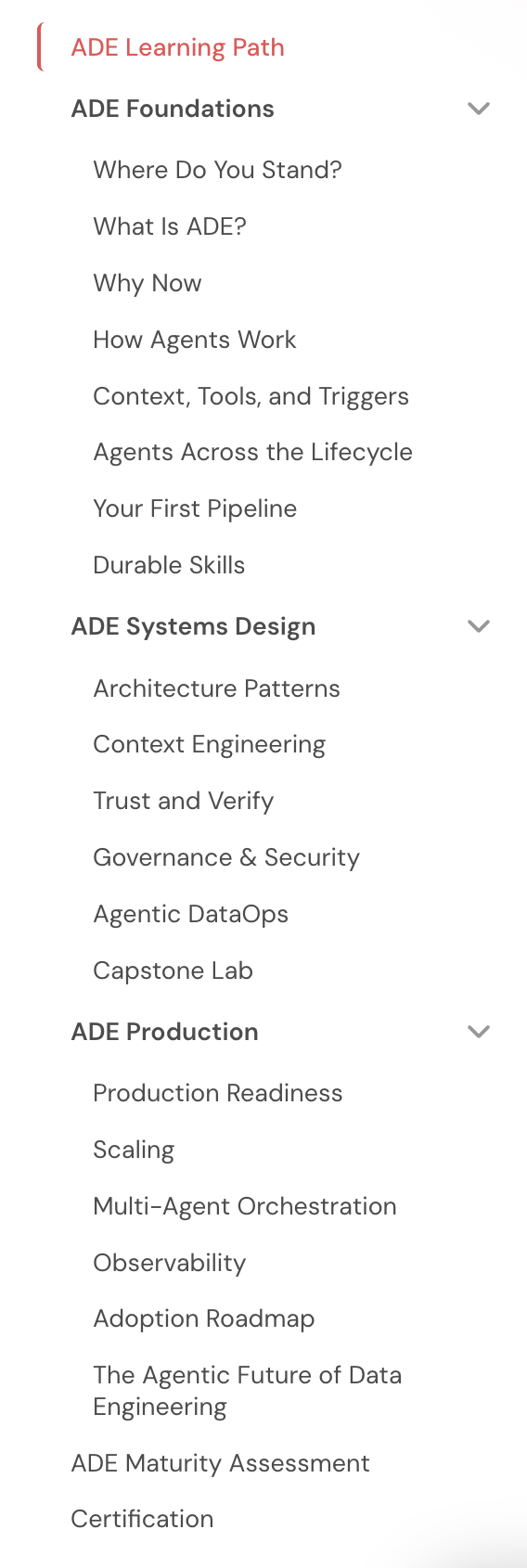
One screen from the finished certification program: 21 modules across the 101, 201, and 301 tracks.
To be clear, I still love and use other AI tools. They matter a lot to my work. But Cursor is where I go when the work has enough moving pieces that it needs agents, not just an answer.
Here are the lessons I’ve learned working this way in Cursor and how it works in practice.
Set up the workspace before you ask for output
Before I ask an agent to write anything, I set up the system around it first. Technical folks call the agentic harness. I mostly think of it as the structure that keeps the work organized and effective.
On the certification program project, that meant shared source materials, a clear plan, reusable reviewing instructions for agents, clear rubrics to define quality standards, and boundaries on what agents could produce without human review. The quality of that setup mattered more than the cleverness of any one prompt.
A sample version of this kind of structure looks like this:
my-project/
├── README.md
├── AGENTS.md
├── context/
│   ├── brief.md
│   ├── style-guide.md
│   └── source-links.md
├── work/
│   ├── plan.md
│   ├── drafts/
│   ├── reviews/
│   └── runs/
├── .agents/
│   └── skills/
│       └── reviewer/
├── outputs/
├── next-steps.md
└── decisions.md
What lives where:
-
README.md: This document outlines what the project is, why it exists, and where a future person (or agent) should start to understand what’s happening and how to navigate the resources in the folder. -
AGENTS.md: These are the working rules for agents in that project. They tell agents how to operate, what files to read first, where outputs belong, and what needs to be updated as the work moves. -
context/: This folder can include any relevant information, document, or artifact that gives the team more detail. It can hold briefs, source materials, definitions, style rules, and constraints. This context is helpful for humans too, and can include subfolders for organization as needed. -
work/: This folder represents the messy middle of agentic work. It gives agents a place to document and refine in a clear, auditable way. Files in the folder might include plans, drafts, review files, and run artifacts. -
.agents/skills/: This folder contains reusable instructions for repeat jobs. You can define skills at a project level for specific operations work, or at a systems level to apply across all the work you do in Cursor. -
outputs/: Store your approved deliverables in a clear place for humans and agents to access. -
next-steps.md: Keeps a running task list for the project and surfaces what remains unfinished. This ensures that if you are working with multiple agents, or with other people in the same folder, everyone has clarity on how to proceed and no work is duplicated. -
decisions.md: Document the choices worth remembering so every contributor to the system understands why something changed.
And this is where I would actually show my AGENTS.md file, because it is doing a lot more than setting tone. Every time an agent starts work, it reads this document, gets oriented to the structure, and learns how to maintain that structure across every new project I start.
## Start Here — Every Session

Before starting any task:
1. Read `USER.md`
2. Read root `MEMORY.md`
3. Check whether a project folder already exists, if not create a folder for the project


## Intake, Output, and Archive Rules

- Drafts and WIP go in `work/`
- Final deliverables go in `outputs/`
- Context files go in `context/`

After completing a significant task:
- Update `next-steps.md`
- Log any meaningful choice in `decisions.md`
That means an agent is not just getting a writing prompt. It is getting operating instructions. Before it starts, it knows which context to load. When it needs to act, it knows which tool layer to prefer. When it creates something, it knows where that file belongs. And when it finishes a meaningful pass, it knows which notes to update so the project stays current without me having to manually remember every bit of upkeep.
But one of the most useful parts of this setup is Skills. In Cursor, a Skill is just a reusable instruction file for a job you do more than once. For this post, for example, I have a writing skill that tells agents to start with interview notes, build an evidence packet, get outline approval, and run an authenticity review before drafting. Instead of re-explaining that process every time, I can point an agent to the Skill and know it has the workflow.
Define the work before you execute it (Plan mode)
In Cursor, Plan mode is the read-only mode. I use it like an execution contract.
For the certification program, the planning process involved a few hours of working directly with an agent to define the curriculum structure, module template, subagent roles, prompts for each role, the review process, the quality rubric, and how certification would be granted once the work shipped. That mattered because it forced me to answer the hard questions early, while changing direction was still cheap.
Before I leave planning mode, I want the plan to answer:
- What are we making, exactly?
- What files or deliverables should exist when we are done?
- What makes something ready for human review?
- What review or validation has to happen before that?
- What artifacts do I need to save so the next pass has context?
- What process should the agents follow to deliver the output?
The biggest shift for me was realizing that agentic output is not mostly a prompting problem. It is a sequencing problem. If the handoffs, review rules, and done criteria are fuzzy at the start, the work stays fuzzy all the way through.
Test one workflow before you scale it
This seems obvious, but one of the biggest traps people fall into with AI is giving it too much to do before they understand where it drifts. I have seen plenty of people complain that AI is ineffective, lazy, or stupid. Sometimes it is. But I usually learn more by figuring out how to use the tool well than by blaming the tool for what it is bad at.
Testing lets you see how agents behave so you can tune the rules, Skills, context, and prompts that shape the outcome.
For the certification program, for example, I did not start by fanning 21 modules out to a swarm of agents. I piloted one module first.
That gave me a controlled place to tune the style guide, the reusable Skills, the subagent prompts, and the review rubric. It also surfaced predictable problems early. Some instructions were too loose. Some reviewers were not looking for the right issues. Some drafts sounded competent but thin.
I would much rather learn that on one module than on twenty-one.
The shared style guide did a lot of work here. Once the agents were reading the same standards, the reviews got sharper and the drafts got more consistent.
Once you are satisfied with the results of a test, it is worth asking agents to codify what worked by updating the references future agents will use. Then you can scale the work. Scaling bad instructions is a very efficient way to create more cleanup.
Run the project with subagents, not one giant prompt
One of the biggest benefits of working in an agentic workspace is the ability to launch subagents. One agent can orchestrate and parallelize work across many others at the same time. For example, one subagent can research internal documentation while another gathers external sources.
And while subagents do help you move faster, the bigger benefit is that each one gets its own context window. It is not carrying the full weight of the last draft or getting attached to the last “good enough” version of the work.
The certification workflow was not one giant prompt. It was a series of bounded subagents with explicit handoffs.
For each module, the flow looked like this:
- A research subagent gathered and organized the relevant source material.
- A writing subagent turned that material into a module draft based on the shared module template.
- Eight reviewer subagents checked the draft from different angles and scored it against a standard rubric.
- A synthesis subagent read those reports, removed duplicate issues, prioritized the fixes, and issued a clear verdict.
- A revision subagent applied the changes.
- The review and revision loop ran again until no major issues surfaced in the reviews.
The reviewer definitions mattered. If every agent did a generic review, I would get eight versions of the same vague feedback. Instead, reviewer subagents embodied different personas and different lenses. Some reviewed as senior data engineers, some as instructional designers. Some looked for clarity or risk, while others checked whether the content adhered to our style guide. These agents did not talk to each other, and that independence was part of the value.
Depending on how many review and revision rounds a module needed, a single module could go through roughly 56 to 112 agent review passes before it ever came to me. Across six ADE 301 modules, I kicked off 56 reviewers in one fan-out. They wrote their reports to files. The synthesis agents read those outputs, deduplicated the findings, and issued verdicts like NEEDS REVISION or ready for human review.
That changed my role in a good way. I was not reading six half-baked modules and trying to merge 48 opinions in my head. I was stepping in after the work had already gone through a serious quality gate.
That is the kind of speed I care about. Faster, yes. But also more thoroughly checked before it lands back on my desk.
Use MCP when the work has to touch a real system
MCP stands for Model Context Protocol. At a basic level, it lets an agent work through a connected tool from inside the same workspace instead of only commenting on local files.
You do not need MCP to get started, and I would not make it step one. But once the work has to interact with a real system, it changes what review can mean.
On the certification project, I used MCP-connected agents to work with Otto (Ascend’s AI agent within the product) inside the Ascend platform itself. Instead of only reading the lab instructions and saying, “this seems right,” the agents could test the prompts in the environment the learner would actually use.
That turned up a very real problem. Some of the lab prompts did not match the data and workflow the platform actually contained. A text-only review would not reliably catch that. In-platform validation did. The agents generated replacement prompts, and those went back into the module revision cycle.
That is a different kind of review. It is much closer to validation than commentary.
It is important to note that permissions matter here. Once you connect an agent to an MCP server, it can take action inside that system. The way I handle that is with tight scoping. In other parts of my ops work, I use MCP servers in Cursor so agents can draft, but not send, emails in Google Workspace, issue certifications for Bootcamp participants on Certifier, do research on prospects in HubSpot, and more.
Connecting agents to tools dramatically increases both what you can deliver and the quality of that output. You just need to be intentional about the limits.
Save the artifacts because recovery is part of the job
At 3:31 a.m., seven hours before the deadline, I had one of the more humbling moments of the whole project. I accidentally permanently deleted the entire 301 course, one third of the project I was finishing, in a way no amount of smashing Command-Z could resolve. Not my best moment.
That could have been a disaster. It was not.
Because the agents wrote artifacts to files at every stage, we could reconstruct the work from transcripts, run artifacts, review reports, and synthesis outputs. The system had memory. The project did not live only inside a chat pane or a single file.
That changed how I think about agent output. Review reports are not disposable. Run notes are not disposable. Synthesis verdicts are not disposable. If the work matters, those artifacts are part of the project.
They help with recovery, but they also make the process inspectable. You can see what changed, why it changed, and which issues kept recurring. For an operator, that matters. I do not just want something that looks impressive when it works. I want something I can recover, inspect, and improve when it does not.
This way of working is getting easier
This way of working is getting easier and more accessible very quickly. I started doing this kind of work in Cursor because it was the only place I really could. I was embedded on an engineering team, so working this way was available to me earlier than it probably would have been otherwise.
That is already changing. You can do versions of this in Claude workspaces now. You can do versions of it in Codex with OpenAI. The agents are getting better. The tooling around them is getting better. The workflows are getting less brittle, less manual, and less dependent on being the one non-engineer sitting in the middle of an engineering team.
So if Cursor feels intimidating, I get it. It felt intimidating to me too. But now is a very good time to start exploring this way of working, because these tools are only getting better from here. The people who will get the most out of that shift are the ones who start building the muscle now, while the stakes are still low enough to learn in public and figure out what actually works for them.